
Fiber Optical Communication

درباره سایت
آخرین مطالب
- به وبلاگ خود خوش امدید
- Analysis of A Practical CWDM System Deployment Case
- Why Not Use EDFA Amplifier in Long CATV Network?
- Why Not Using DWDM Technology to Build Your Network?
- Optical Transponder—an Important Component in WDM System
- How to Build an Economical Long-haul 500Gbps Metro Network?
- Fiber Optical Communication
- Why Do We Need Optical Transponder (O-E-O)?
- CWDM Technology—Economically Saving Fibers for Your Network
- Confused About Loss in the Long Haul DWDM Network?
امکانات وب
With the continuously growing demand for higher capacity and bandwidth, the deployment of 40G Ethernet network becomes much more necessary than ever before. As one of the key components to accomplish a whole 40G coection, QSFP+ transceiver, a compact, hot-pluggable module, is designed with four independent chaels to transmit and receive 10G signals, supporting 4x10 Gbit/s data rates. This kind of module can be used both in 40G to 40G application where one QSFP+ transceiver will be coected to another QSFP+ transceiver and in 10G to 40G application where one QSFP+ transceiver will be coected to four SFP+ transceivers.
Do you also want to upgrade your system from 10G to 40G Ethernet network by using QSFP+ transceiver? The following will detailedly describe the step-by-step procedures for installing QSFP+ transceiver and attaching optical network cable to the transceiver, which will be helpful for you to achieve a fast, smooth and seamless 40G network deployment.
QSFP+ Transceiver Installation
Before installing QSFP+ transceiver, three tools should be prepared for the 40G migration. One is the wrist strap or other grounding device with the function of avoiding ESD (electro-static discharge) occurrence. Another is the antistatic mat or antistatic foam, capable of setting the transceiver on. The other is the equipment for fiber-optic end-face cleaning and inspection. All of these tools are indispensable for making a secure and smooth installation.
After that, you can start to install the QSFP+ transceiver according to the following procedures. Considering that there is either a pull-tab latch or a bail-clasp latch in QSFP+ transceiver, the procedures for both types will be listed below.
- Put the ESD wrist strap on and attach the other end of the ESD wrist strap to a properly grounded point on the chassis or the rack.
- Get the QSFP+ transceiver by removing its protective packaging.
- Check the QSFP+ transceiver label and confirm whether the type of the module is suitable for your network or not.
- Remove the optical bore dust plug from the transceiver and store it in a clean place, therefore it can be easily found and fast used next time.
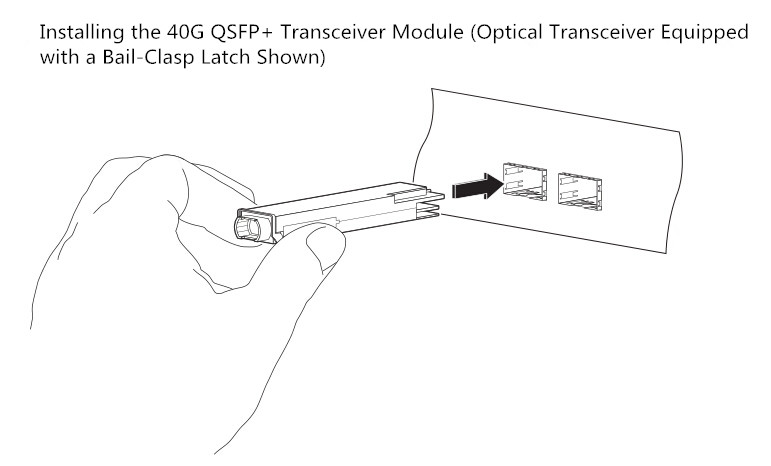
- Since there are two kinds of latches for the transceivers, they should be coected to your network in different ways. As for the transceiver with a pull-tab latch, you should hold it to ensure the identifier label is on the top. As for another transceiver, you should keep its bail-clasp aligned in a vertical position (see the following figure).
- Then align and slide the transceiver to the module socket carefully until it contact with the socket electrical coector.
- Press firmly on the front of the QSFP+ transceiver with your thumb to fully seat the transceiver in the module socket.
- Reinstall the dust plug into the transceiver optical bore before attaching the optical network cable to the transceiver.
Optical Network Cable Attachment
After installing the QSFP+ transceiver, you should attach the optical network cable to the transceiver to finish the whole 40G transmission. But how to attach the optical network cable? What should be paid attention to in the attaching procedures? The following will talk about this topic and give you answers.
Before making the 40G coection, you should ensure that the unplugged optical network cable coectors and the transceiver optical bore are protected by the dust plugs. Meanwhile, you should also check and clean the MPO coector or duplex LC coector end faces. Besides, you can only grasp the coector housing to plug or unplug the optical network cable. Once these points are confirmed, you can attach the optical network cable to your network.
The procedures for attaching the optical network cable to the transceiver are shown below.
- Remove the dust plugs from the optical network interface cable coectors and the QSFP+ transceiver module optical bores. Also, keep the dust plugs in a clean place.
- Check and clean the coector end faces of the optical network interface cable.
- Immediately attach the optical network interface cable coector to the QSFP+ transceiver.
- Pull slightly on the cable coector boot to check whether the optical network cable is fully seated. If not, please reattach it and make it seated.
Conclusion
From this paper, it can be easily learned to install the 40G QSFP+ transceivers and attach the optical network cables to the QSFP+ transceivers, hence the 40G coection can be smoothly finished in a correct way. Using the methods mentioned above to upgrading your network can protect the QSFP+ transceivers from being damaged and keep a stable performance for the 40G coection.
برچسب:
نویسنده: پارسا رضایی